






Mastering Polymarket: These 7 Tools Are All You Need (Complete Tutorial Included)


- Core Insight: This article systematically reviews seven third-party tools built around the Polymarket prediction market ecosystem. It aims to address the shortcomings of the native platform in terms of trading experience, data analysis, and information integration, providing targeted options for users with different needs and experience levels.
- Key Tools:
- Betmoar: The most comprehensive trading terminal, integrating professional market views, holder analysis, news feeds with price correlation, expiration calendars, and more. It is particularly suitable for experienced users conducting in-depth analysis.
- Bullpen: Co-created by renowned trader Ansem, featuring a clean and intuitive interface. Its core logic is tracking and visualizing "smart money" movements, making it easy for users familiar with meme trading tools to get started quickly.
- Polymarket Analytics: The analysis platform with the broadest data coverage, providing detailed profit/loss history for over 2.3 million traders, market category rankings, and unique historical charts for open interest. Ideal for learning about specific sectors and judging capital flow.
- Glint: Focuses on news and intelligence-driven trading. It uses AI to scan multi-source information and link it to markets. Its unique 3D globe tracks real-time signals like global military flights, providing an information edge for geopolitical traders.
- Kreo: Offers a web interface and Telegram bot. Core features include a cross-platform news feed (covering Polymarket and Kalshi) and monitoring for abnormal large-volume trades, supporting automatic copy trading. Suitable for news trading and reducing screen time.
- Guru: Specializes in wallet strategy analysis. It uses AI to generate trader profiles and strategy scatter plots, helping users judge the operational style of copy trading targets. More suitable for screening before copying and strategy review.
- The Trade Fox: Provides a categorized library of smart money wallets for copy trading and features cross-platform arbitrage aggregation. However, some functions are currently incomplete, and the user experience needs improvement.
Original Author: Changan, Biteye
In recent months, a number of high-quality third-party tools have emerged within the Polymarket ecosystem.
As a heavy user of prediction markets, our editor has personally tested all these tools, and several have become daily essentials. Today, we've compiled the most recommended ones to share with everyone.
The lag and missing features of the native Polymarket interface can largely be compensated for by these tools - smart money tracking, real-time news feeds, news trading, all available. 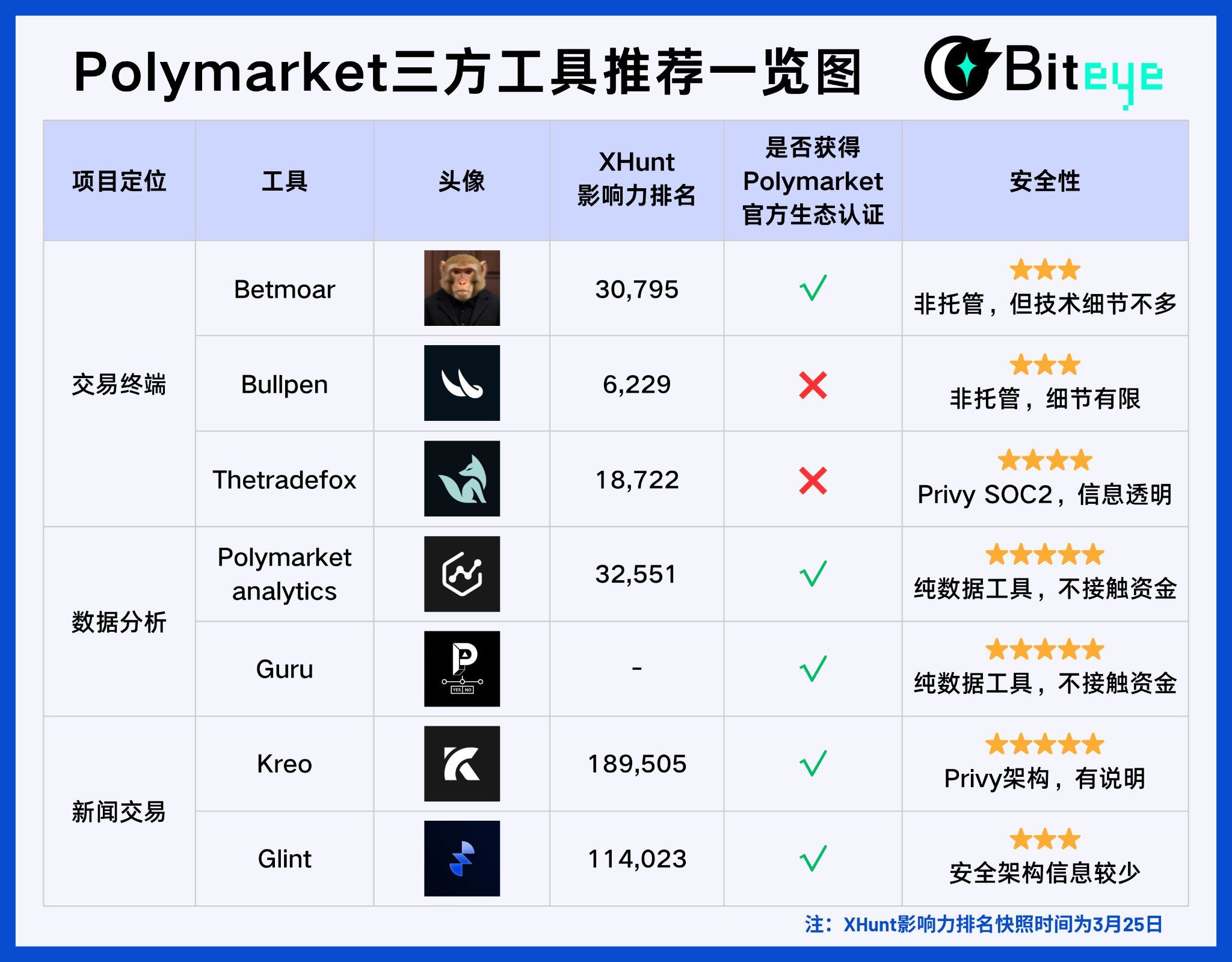
1. Trading Terminals · Fast Order Execution
🔴Betmoar @betmoardotfun (XHunt Ranking: 30795)
Product Introduction:
Betmoar is the most feature-complete trading terminal for Polymarket, with trading volume exceeding the sum of all other products in the Polymarket ecosystem.
Markets provides a professional-grade market view, supporting large position tracking and capital flow monitoring.
Profiles allows you to view the profile and historical performance of any trader; News integrates sources like X and Truth Social, directly annotating real-time information onto relevant markets, with voice broadcast support.
The UMA module tracks voting dynamics and UMA Discord resolutions in real-time, helping users gain an information advantage in disputed markets.
📕User Guide:
Betmoar is the platform our editor uses most frequently and considers the best. Many trading needs on Polymarket can be met on Betmoar. Below, we introduce how to use it from five dimensions:
1. Analyzing Polymarket Markets
If we use a meme analogy, Betmoar's position in market analysis is equivalent to GMGN in on-chain trading.
Take ["Will the US enter Iran before April 30?"] as an example: the left side shows the real-time price chart for Yes, and the right side shows the news feed related to the event, displayed side-by-side, all on one screen. News comes out, how the price reacts, where the current probability is - no need to switch back and forth between multiple pages.
For news-driven traders, this design is crucial. The window between news and price movement is often only a few minutes. Having information integrated helps you make faster judgments. 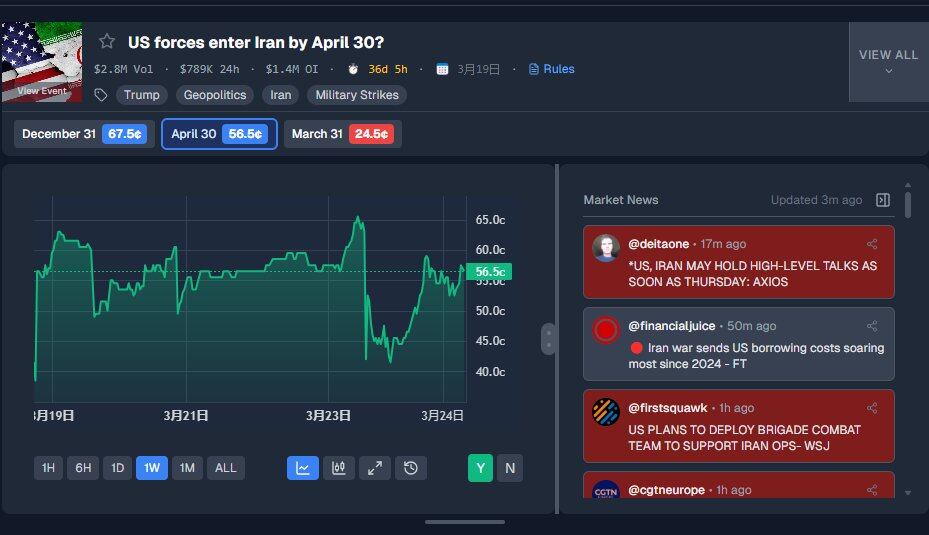
2. Holder Analysis
Below the market page, you can view holder details for that market. Here are three features worth focusing on.
- Market Strength: Betmoar evaluates which side, Yes or No, has smarter holders by synthesizing multiple indicators like holder balance, weighted PnL, PNL, and trader quality. Following the smarter side is often the simplest way to determine direction.
- Insider Wallet Identification: Betmoar automatically filters new wallets trading that market, helping you quickly judge if insider funds have entered early, saving manual investigation time.
- Wallet Tags: The platform applies visual tags to each wallet, e.g., new wallets appear as saplings, high-profit as brains, ultra-high balance as diamonds. You can see the holder profile at a glance without checking each one.
3. Median PNL vs. Average PNL
PNL is an important metric for gauging an address's skill, but average PNL can easily be skewed by a single highly profitable whale - for example, if our editor's assets are averaged with Jack Ma's, it might exceed billions, but that doesn't mean much.
Betmoar provides both median PNL and average PNL. The median excludes extreme values, more accurately reflecting the overall level of holders on a particular side, making it a more reliable indicator for judging where the smart money is.
4. Event Expiry Calendar
Betmoar's Calendar page provides a date-sorted market expiry calendar. All markets about to settle are displayed on their corresponding dates, including current probability and market name.
The page supports quick filtering by tags like Popular, Newest, Has Reward, Has Bond, Sports, etc. You can also save custom filter conditions for direct use next time. Additionally, you can filter by price range and APY, helping users specializing in end-game strategies quickly find high-certainty, near-settlement markets.
For traders accustomed to end-game strategies, this page is a must-see. 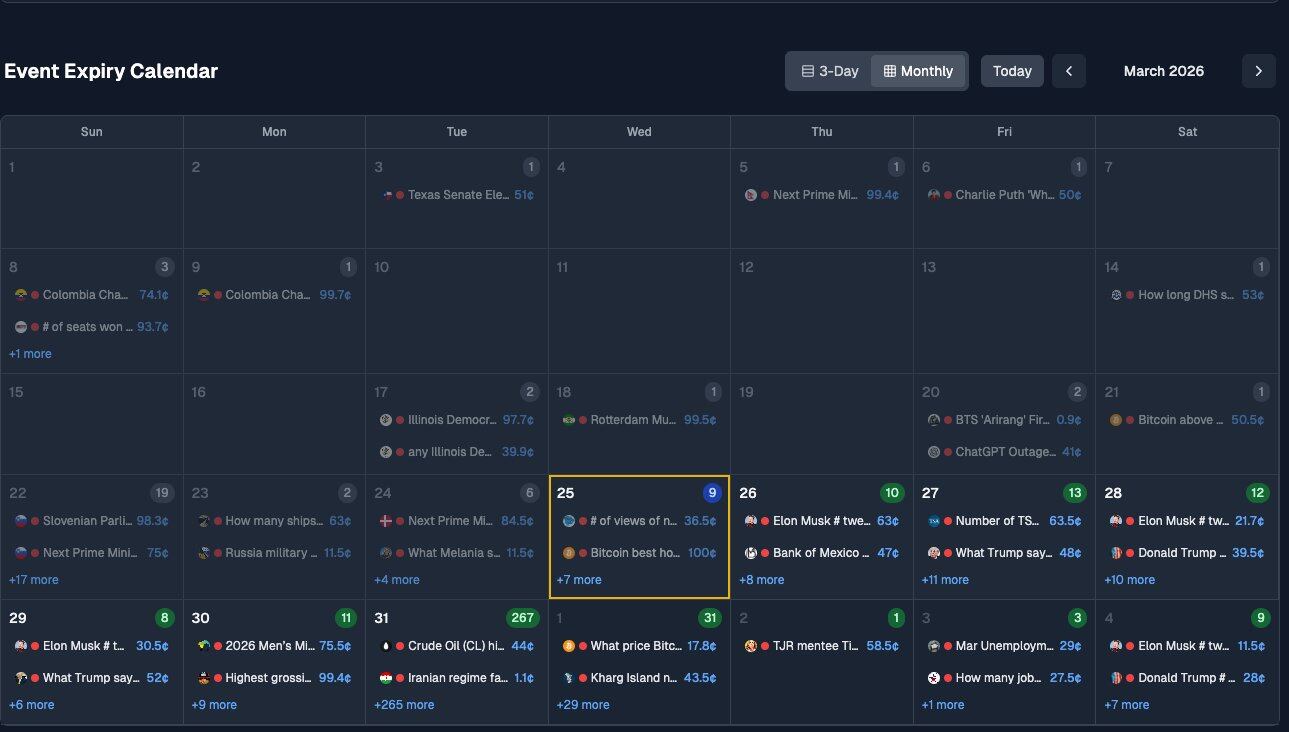
5. News Feed
Betmoar's News page is designed specifically for news-driven traders.
The left side is a real-time information feed integrating news from multiple sources like X and Financial Times. Each message is tagged with a relevance score: yellow up to 2 points, orange up to 3 points, red 4 points and above. Higher scores indicate greater potential market impact. The top allows filtering news by category and setting a minimum score threshold to filter out low-relevance noise.
Clicking any news item automatically pops up all related markets on the right, directly showing current price, liquidity, and 5-minute/30-minute/3-hour price changes. 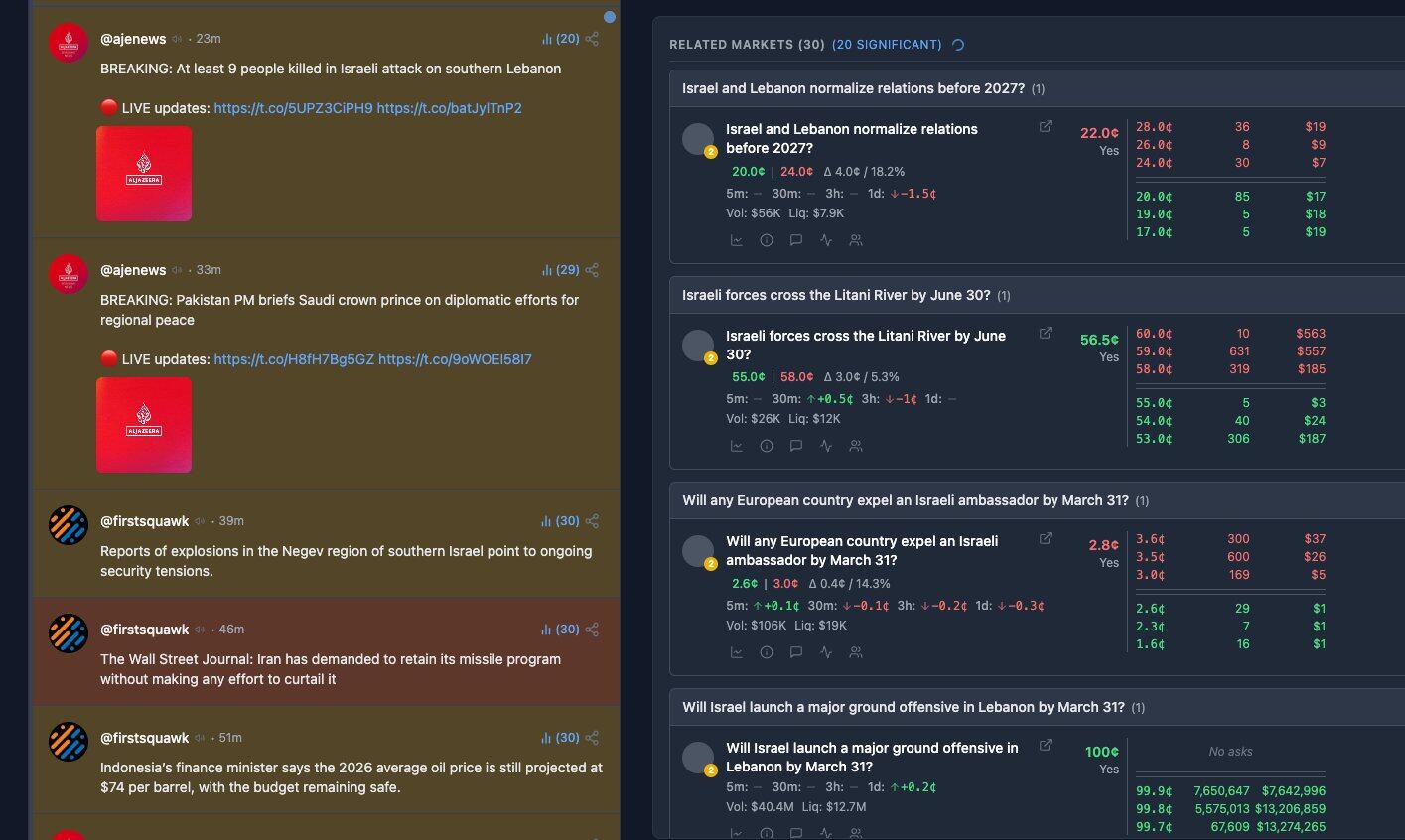
💡Biteye Review: Betmoar is the product our editor uses the most and the most feature-complete Polymarket terminal. Many product details show the developers are experienced Polymarket users themselves, so its professionalism is top-tier. However, its many features might not suit novice users.
🟠Bullpen @BullpenFi (XHunt Ranking: 6229)
Product Introduction:
Bullpen is an all-in-one crypto trading app co-founded by renowned on-chain alpha caller Ansem (@blknoiz06) and co-founder @salxyz, integrating Polymarket prediction markets and perpetual contracts in the same interface.
Users can track smart money trades, whale large trades, and biggest wins in real-time. Additionally, Bullpen has a built-in CLI tool that, combined with Claude Code, can directly fetch on-chain data, analyze market signals, and execute positions. It's one of the few Polymarket third-party terminals that integrates AI analysis with trade execution.
Ansem has previously bet on Solana (2023), memecoins (2024), Hyperliquid (2025), and listed Polymarket as his most important bet for 2026. Bullpen is his core play in the prediction market infrastructure space.
Bullpen has completed a seed round led by 6th Man Ventures, with other investors including Manifold, Karatage, and other crypto and fintech institutions.
📕User Guide:
If you often trade memes, Bullpen will feel very familiar. The entire product's design logic is highly similar to meme trading tools, with the core being following smart money. Bullpen also excels in visual presentation, with a cleaner, more intuitive interface that new users can understand at a glance.
1. Discover: See What Smart Money is Buying
Meme traders understand that finding what smart money is buying is easier than analyzing yourself. Bullpen's Discover page brings this logic to prediction markets.
- Smart Money: Shows how many smart money wallets are currently buying a particular market simultaneously and the buy amount.
- Whales: Displays the latest large whale trades. You can see what direction they bought and how much they spent.
- Biggest Wins: Shows recent highest-profit trades. If you think a wallet is skilled, click Track to follow its subsequent moves.
2. Trending: Markets Where Smart Money is Gathering
Trending's logic is also simple: it lists markets that smart money is buying into. "Trending" means 5+ smart money wallets have entered simultaneously; "Heating Up" means 2 to 4 smart money wallets are active, still in the warming phase.
The page supports filtering by category and time. Each market card directly shows the direction and whale buy amount. See a suitable one, click in, and place an order.
3. Analytics: In-depth Holder Analysis
Below each market detail page is an Analytics tab. Here you can see detailed data comparisons between Yes and No holders, including cash balance, weighted PnL, median PnL, as well as holder account age distribution and historical PnL tiers.
Unlike other tools, Bullpen doesn't directly give you a "which side is smarter" conclusion. Instead, it presents the complete data for your own judgment. For example, you can see what percentage of Yes holders are new accounts, how many No holders are veterans with over $100k in historical profit. The user quality on both sides is clear at a glance.
The PnL Distribution page also provides a heatmap view, ranking the top 100 holders by position size. Green represents profit, red represents loss. Which side has higher-quality capital is clear with a glance. 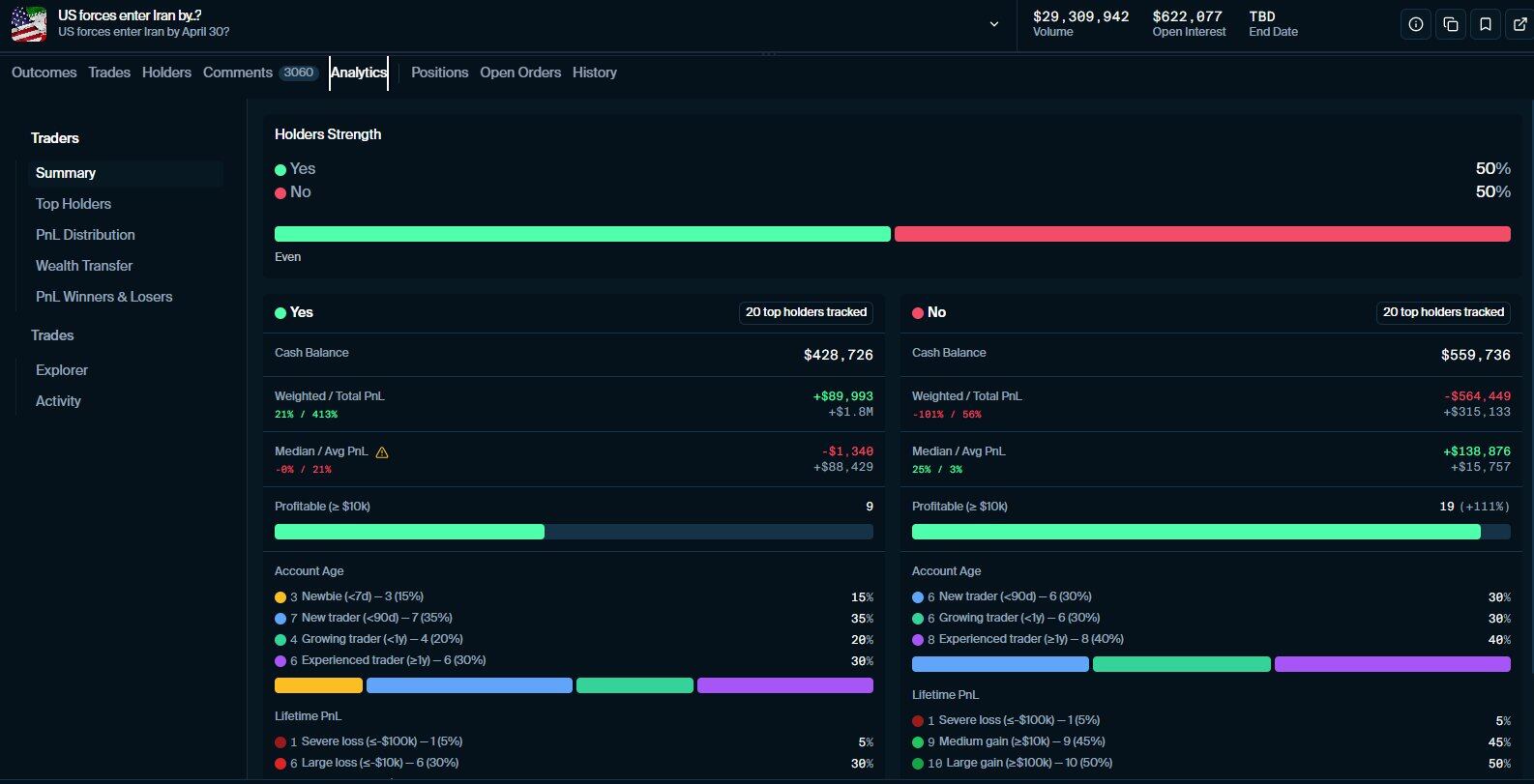
💡Biteye Review: Bullpen's features, while not extensive, have excellent UI. Possibly benefiting from Ansem's influence in memes, Bullpen excels in market holder analysis. Its user experience is also very similar to meme terminals, making it suitable for on-chain meme users transitioning to prediction markets.
🟡Thetradefox @tradefoxai (XHunt Ranking: 18722)
Product Introduction:
The Trade Fox is a prediction market aggregation terminal co-founded by Yoshi (@tradefoxintern), securing approximately $1.1 million in Pre-Seed funding from Alliance DAO and CMT Digital.
Different from other terminals, TradeFox has a built-in, finely categorized smart money wallet library covering high-win-rate players, trading bots, suspected insiders, sports/politics/weather specialized wallets, and more. Users can directly copy-trade any wallet. Currently focused on Polymarket, with plans to integrate Kalshi, Limitless, and other platforms later.
📕User Guide:
TradeFox's top navigation has Lightning, Trade, Copy, Tournament, and Portfolio modules.
1. Trade: Market Details
Our editor wanted to use the ["Will the US enter Iran before March 31?"] market for comparison but encountered search functionality issues. TradeFox's search is currently not very effective; often, desired markets cannot be found. It's recommended to browse directly under the corresponding category tags - go to Geopolitics for related markets, Crypto for crypto-related ones.
For the same market, TradeFox's holder analysis is currently quite basic, with only simple holding rankings. It lacks dimensions like account age, historical PnL, wallet tags, offering relatively limited reference information. Hopefully, future versions will add these. 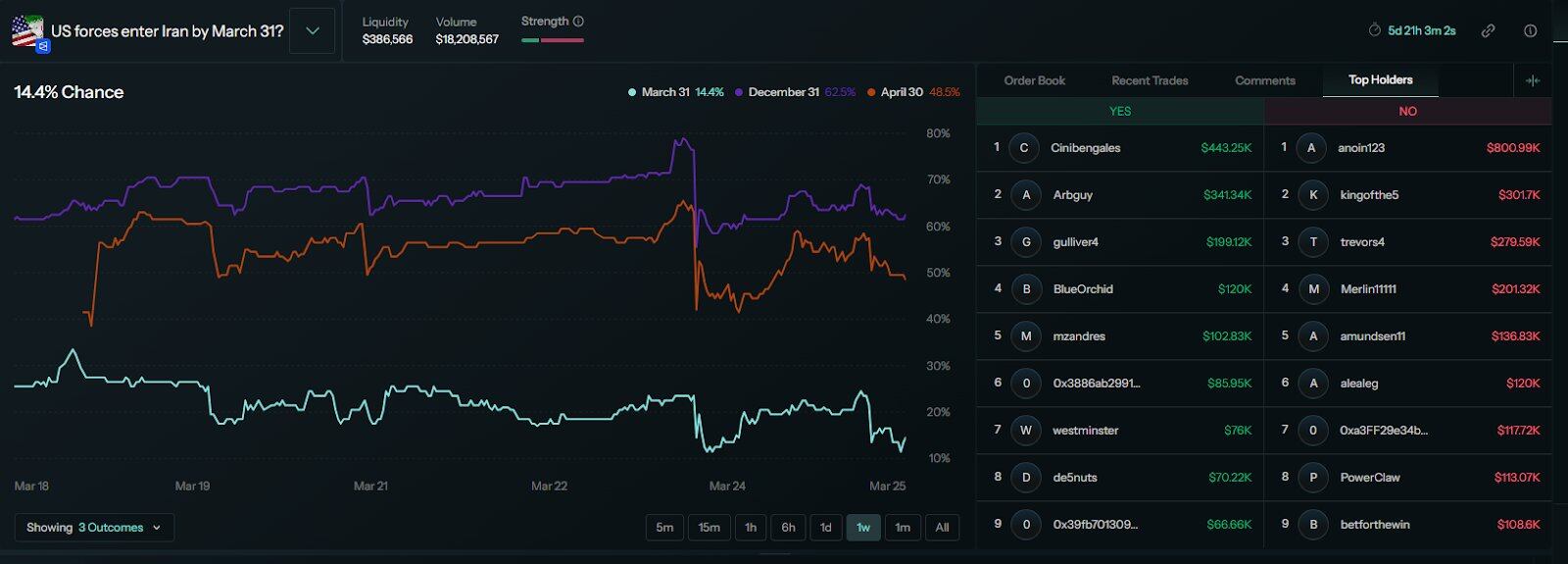
2. Calendar: Expiry Calendar
The Calendar page displays all upcoming settlement markets by date, suitable for planning opportunities in advance. However, this page currently lacks filtering options by category. Daily recurring markets like Bitcoin price predictions and weather markets get mixed in, creating more noise.
The TradeFox page has an "Exclude Categories" filter option, theoretically allowing you to block noise markets like daily Bitcoin price or weather predictions. However, this feature is not yet fully implemented; clicking it shows no tags available.
Compared to Betmoar's calendar, which can filter by category and relevance score, TradeFox requires more manual screening time here. It's recommended to use the probability and volume filters in conjunction. Setting volume above 10K can filter out most low-quality markets.
3. Aggregator: Cross-Platform Arbitrage
This is currently a unique feature of TradeFox not yet integrated into other platforms.
The Aggregator page displays similar markets from Polymarket and Kalshi side-by-side,标注 matching degree and price differences between the two. If the same event has different odds on two platforms, an arbitrage opportunity exists: buy on the cheaper side and profit when prices converge.
💡Biteye Review: Founder Yoshi is a seasoned Polymarket user who frequently shares insights on Polymarket mechanisms on Twitter. However, the product's functionality is still lacking, with most features not yet launched, resulting in a suboptimal user experience for now.
2. Data Analysis · Finding Smart Money
🟢Polymarket analytics @poly_data (XHunt Ranking: 32551)
Product Introduction:
Polymarket Analytics is currently the most comprehensive data analysis platform in the prediction market space. Founded by data engineer Primo Data, it has been cited by The Wall Street Journal and CoinDesk and received official support from Polymarket. In March this year, it was acquired by the smart money copy-trading platform PolyGun, further integrating data capabilities.
The platform currently tracks over 2.3 million traders, 180,000 markets, and nearly 120 million position records. It supports viewing the complete PnL history of any wallet by category (politics, sports, crypto, etc.), making it the third-party Polymarket analysis tool with the broadest data coverage.
📕User Guide:
1. Analyzing Addresses
Enter the Traders page. The Category dropdown menu at the top supports filtering leaderboards by market category. The categorization is very detailed. If you primarily trade geopolitical markets, filter for that category to find addresses that are truly profitable in that field.
After finding an address of interest, clicking in reveals a complete wallet profile. The Overview page shows current holdings, historically most profitable markets, and strongest categories, giving a quick sense of the address's general style.
Our editor frequently uses the Categories tab. It lists the wallet's rank, total number of positions, win rate, and PnL data for each category. You can quickly judge if the address is an all-rounder or an expert in a specific vertical.
For example, imjustken ranks 16th in Politics with a 63% win rate and 25th in Trump-related markets with a 63.5% win rate, indicating he is a professional player in the political arena. When copy-trading, prioritize following his new moves in this direction. 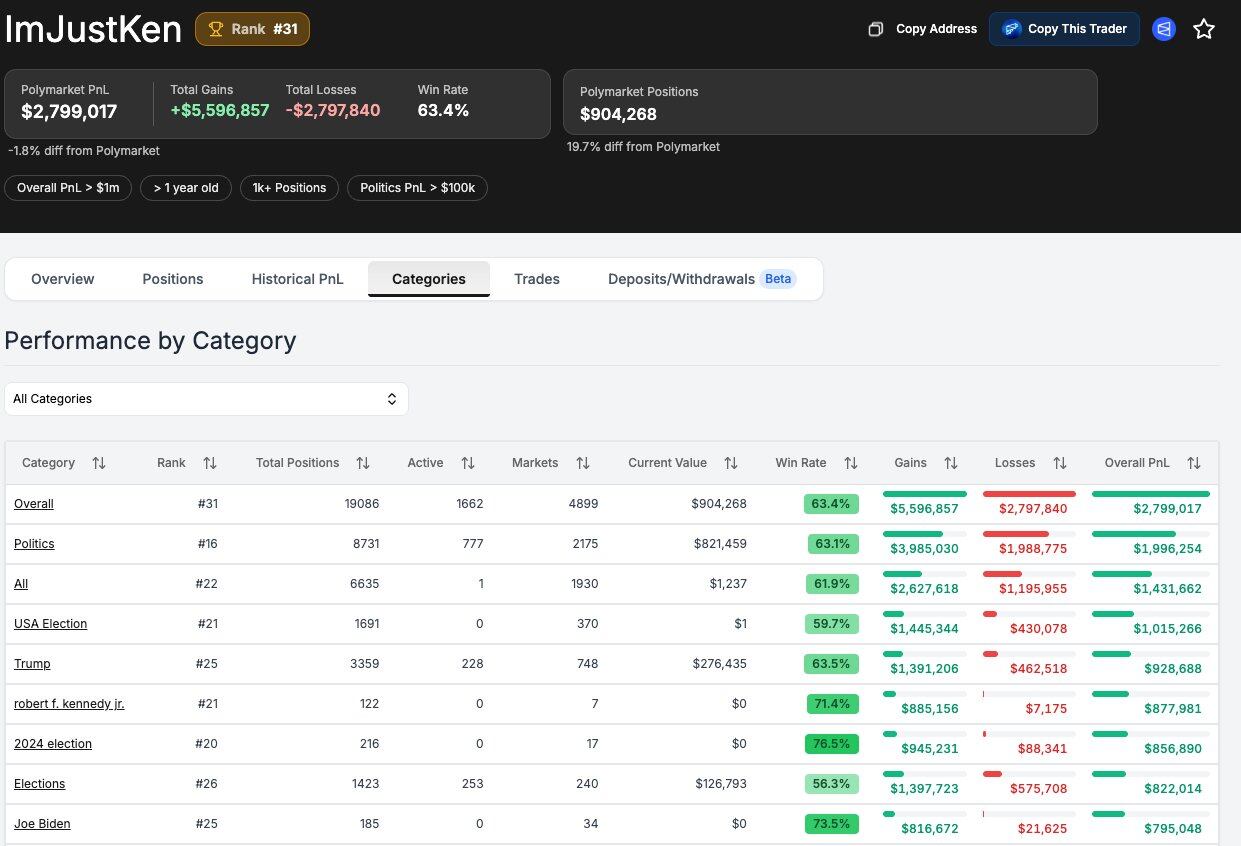
2. Market Analysis
Enter any market page. Polymarket Analytics has a feature currently unavailable in other tools: the Open Interest (OI) historical chart. OI represents the total capital locked in the current market. A continuously rising OI indicates more capital is flowing in, serving as a key indicator for judging market heat and capital inflow trends.
The Positions page shows all holding addresses in that market, ranked by profit. Each address has detailed text labels next to it, e.g., total PnL over $1M, account over 1 year old, political PnL over $100k, etc. Compared to Betmoar's emoji tags, the labels here are more precise and also mark negative information, such as an address losing over a certain amount in a specific category. 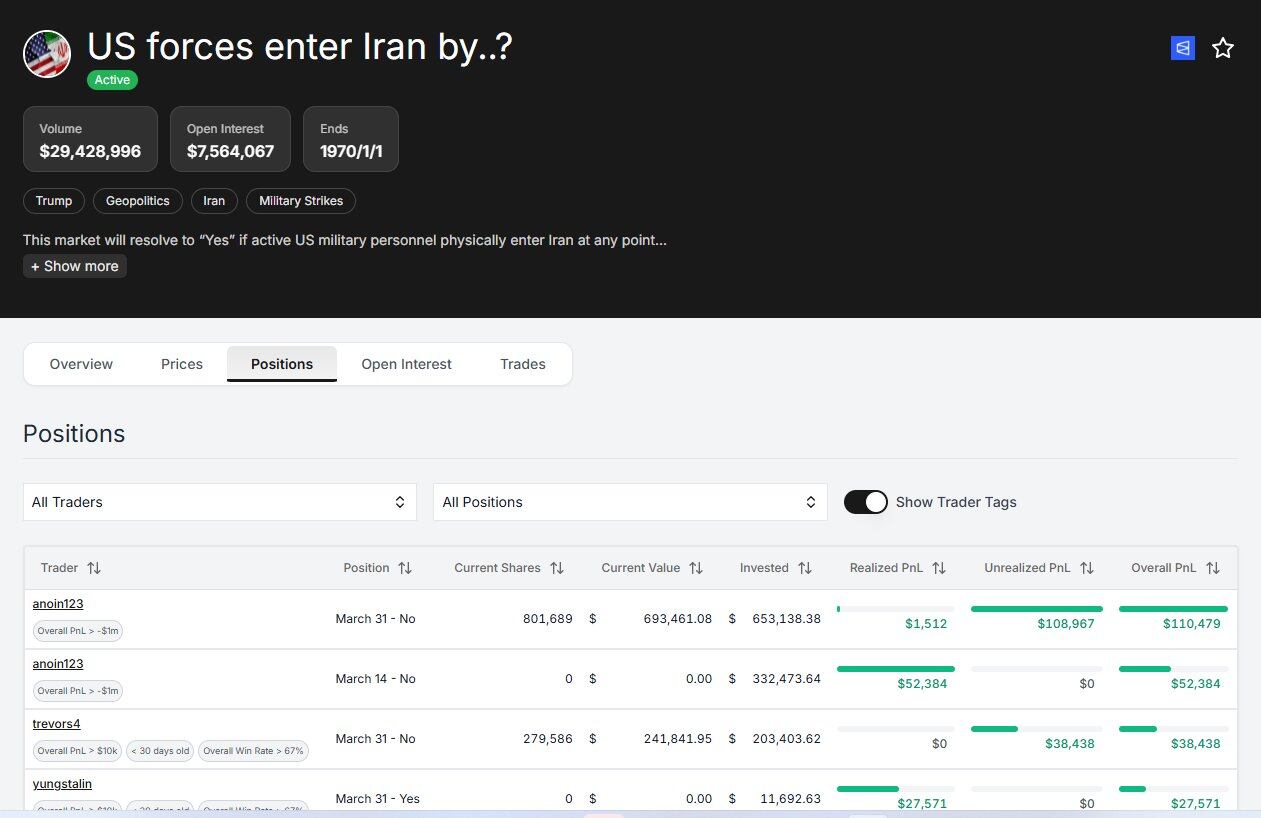
💡Biteye Review: Polymarket Analytics is perfect when you want to learn a new sector. The first step in learning is imitation. You can find users in specific sectors on Polymarket Analytics and learn their operations by analyzing their trade timing, positions, and prices.
The OI historical chart is also a feature not found in other tools, suitable for judging whether capital is still flowing in before entering a position.
🔵Guru @predictsguru (XHunt Ranking: None)
Product Introduction


